Robot Girl AI: CapCut vs AI, other tools and prompts
Updated:
Short answer
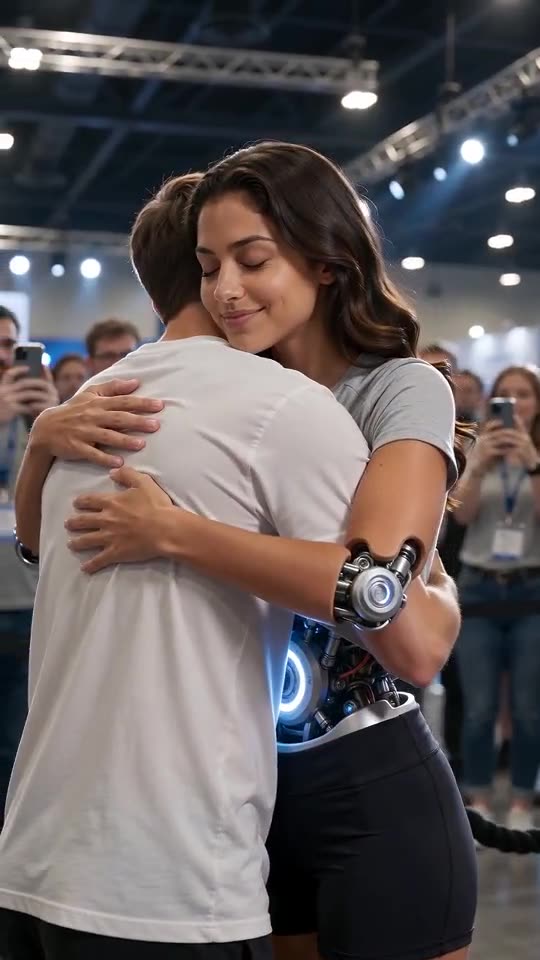
We did not find a CapCut template for Robot Girl: the original clips are AI videos. In CapCut you would edit a clip yourself. MimicZip generates a new 10-second android story with a glowing core from one photo, with its own lines and crowd sound.
Two ways to get a Robot Girl clip
- In CapCut: you need a base clip and the editing skill to put your face on it; there is no ready one-photo template that we found for this trend.
- On MimicZip: one photo, a story, a place, a core colour and an outfit; the scene, the crowd and the glow are generated.
- Who can be in it: adults only here; we do not accept pets, toys or children.
- What comes back: a 10-second 720p clip with no text, logo or branding.
- Cost: CapCut has free and paid features, so check its current plans. Here 1 credit is one video with no watermark.
Which one to use
Stay in CapCut if you want to cut your own footage together. Use MimicZip if you want the finished android scene from one selfie; you can still trim it and add text in CapCut afterwards.
Robot Girl AI vs a general AI video tool: which is easier?
A general AI video tool can make an android clip, but you write the scene, keep your own face on it and pay per try. MimicZip has six written stories, keeps your face from one photo and costs 1 credit for the 10-second clip, with watch-only previews to check first.
What is different
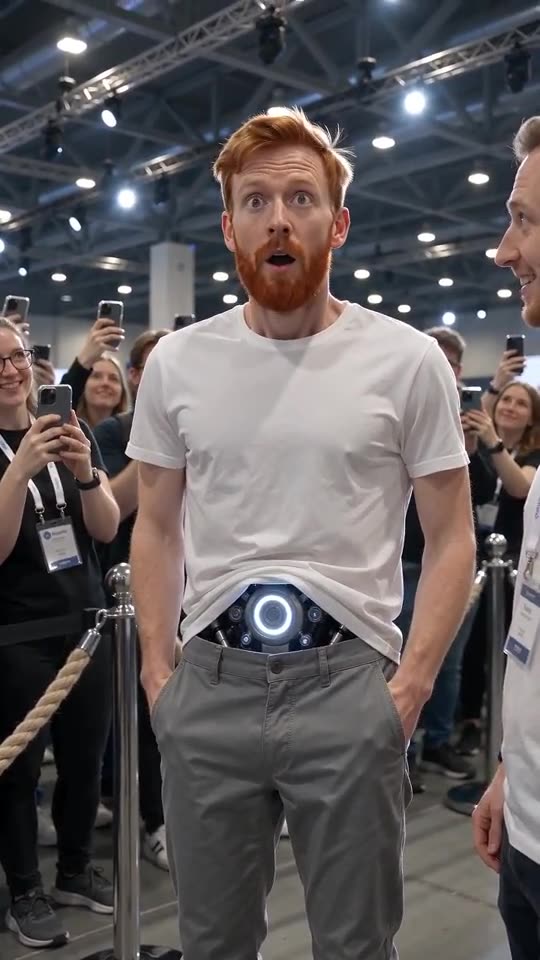
- The scene: a general tool needs a long prompt for the crowd, the rope barrier, the lines and the glow; here the story is written.
- Your face: in a general tool, holding one face through a hug and a head turn takes several tries; here it comes from the photo.
- The format: one handheld phone shot, ten seconds, with spoken English lines.
- The cost: a general tool charges for every try; here a failed run returns its credit and previews are watch-only extras.
Which one to use
A general tool gives freedom to invent a new story, and you can copy our written scene from the prompt pages. MimicZip suits you when you want the known Robot Girl format from one photo without prompting.
Robot Girl prompt for Kling: a copyable first-hug prompt
Copy the prompt below into Kling and attach one photo of an adult. It covers the expo, the glowing core, the visitor’s question, the look to the technician and the hug in one handheld shot. It names no account or brand. Expect a few tries, or use MimicZip.
Copy this prompt
Image-to-video, 9:16, about 10 seconds.
Reference image 1 is an adult android: keep their real face, hair and skin tone exactly; the only machine part is an opening at the waist with a silver mechanical core glowing blue-white.
Scene: a huge technology expo hall with a steel-truss ceiling, rope barriers and a crowd filming on phones. One continuous handheld phone shot at eye level, no cuts.
0 to 2 s: the android stands still; a visitor in a white T-shirt asks, "Can I give you a hug?" A technician in a black polo stands behind with folded arms.
2 to 4 s: the android looks at the technician for permission; he smiles and nods, "Go ahead."
4 to 6 s: the android stiffly lifts both arms out, joints whirring.
6 to 8 s: arms close around the visitor, eyes shut.
8 to 10 s: a slow warm smile, the core pulses, the crowd keeps filming.
Audio: crowd murmur, the two short English lines, soft mechanical whirs. No music.
Photorealistic, no text, no logos, no watermark.
How to use it
- Attach one photo of an adult as image 1, head to waist or lower.
- If the face drifts, add: the android’s face is exactly the face of reference image 1.
- Tools change often, so check the length and aspect ratio your tool supports.
Robot Girl prompt for Veo: a copyable first-pocket prompt
Copy the prompt below into Veo and add one photo of an adult as the reference. It describes the expo, the glowing core, the hands sliding into pockets and the whispered “Pockets?” in a single handheld shot. Veo tools vary, so adjust the length to what yours allows.
Copy this prompt
A realistic handheld phone video, vertical, about 8 to 10 seconds, one continuous shot at eye level.
The subject is the adult in the reference photo, shown as a human-looking android: keep their face and hair exactly; a silver mechanical core glows blue-white through an opening at the waist.
Location: a big tech expo with rope barriers and a crowd filming on phones.
Action: the android looks down at their hands, slowly slides both hands into the pockets of their shorts, freezes with wide eyes, looks up astonished and whispers, "Pockets?" A visitor laughs and points; the android keeps their hands in the pockets with a small proud smile.
Sound: crowd murmur, one whispered English word, soft whirs. No music.
No text, no logos, no watermark.
How to use it
- Use a head-to-waist photo so the core has somewhere to sit.
- If your tool limits the length, drop the last beat.
- Add a sound in TikTok afterwards if you prefer your own.
Robot Girl prompt for Seedance: a copyable first-compliment prompt
Copy the prompt below into Seedance and attach one photo of an adult as the reference image. It covers the expo, the compliment, the hair tuck, the core turning pink and the shy thank you in one handheld shot. It names no account or brand; expect a few tries.
Copy this prompt
Image-to-video, 9:16, 10 seconds, no reference video.
Reference image 1 is an adult shown as a biomimetic android: keep their face and hair; an opening at the waist shows a silver core with a blue-white glow.
Setting: a large tech expo, rope barrier, crowd filming on phones, one continuous handheld shot.
0 to 2 s: a visitor says warmly, "You look amazing!" The android turns slowly toward them.
2 to 4 s: the android blinks and tucks a strand of hair behind their ear.
4 to 6 s: the core glow warms to soft pink; the android looks down at it, a hand on their chest.
6 to 8 s: a shy smile; "Thank you."
8 to 10 s: the visitor presses a hand to their heart; the crowd cheers softly; the pink glow keeps pulsing.
Audio: crowd murmur, the two short English lines, soft whirs. No music.
No text, no logos, no watermark.
How to use it
- Attach one head-to-waist photo as the only reference image.
- Keep the lines short; long dialogue tends to be mangled.
- Seedance settings change, so check the resolution and length your plan allows.
Questions people ask
Is Robot Girl AI made by CapCut or TikTok?
No. MimicZip is an independent tool, not linked to CapCut, TikTok or the account that posted the trend.
Can I use both?
Yes. Download the MP4 and open it in CapCut to trim it or add a sound.
Is there a CapCut template with the same story?
We did not find one at the time of writing, so check the app if you need one.
Can I use the same prompt in another tool?
Yes. The prompt pages show a copyable version, though results differ by tool.
Which is cheaper?
It depends on how many tries your tool needs. Here a run is a fixed 1 credit.
Does MimicZip use its own model?
No. It uses a paid third-party AI video model behind a fixed scene.
Why does the prompt name the lines?
Without them the model may invent a language or a long speech. Short English lines keep the beat. This page is independent and not affiliated with the account that posted the trend.
Will the result match the trend exactly?
Not exactly. Faces, motion and timing change with the tool and the photo.
Do I have to write a prompt on this site?
No. MimicZip uses a fixed written story, so you add a photo and pick options.
Why does the prompt keep the face fixed?
Without that line a model often redraws the face while the hands move. This page is independent and not affiliated with the account that posted the trend.
Can I make other stories with it?
Yes. Swap the action paragraph for the hug, the compliment or the rain.
Is there a ready version on this site?
Yes. MimicZip has six stories written and you only add a photo.
Why does the glow change colour?
It is the beat that makes the compliment readable without words. This page is independent and not affiliated with the account that posted the trend.
Is this what MimicZip runs?
MimicZip runs a longer written version of the same idea, with places, colours and outfits as presets.
Will it match the original clip?
No. It is the same kind of scene, not a copy.
Make your own Robot Girl video
Upload one photo and make a 10-second HD video from $8.99. No subscription, and the full video has no watermark.
Make my video